Url Video Player
Screenshots
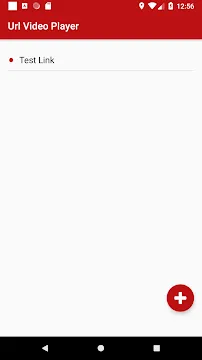
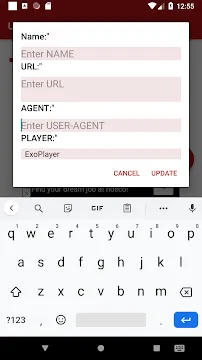
Url Video Player is a stream-lined utility designed to play online video content directly through direct web links. It cuts out the need to download massive video files onto your phone storage before watching them. Instead, you paste a network link into the application to begin streaming instantly. This software decodes multiple streaming protocols with high efficiency, ensuring a reliable playback process. It works well for users who frequently access cloud video links, private network streams, or web-based video feeds. By maintaining a clean layout, it avoids confusing settings and gets straight to the point. The tool focuses entirely on decoding accuracy, transforming raw internet addresses into smooth, clear visual playback.
How Url Video Player Decodes Online Streams
The core engine of Url Video Player relies on powerful software codecs to render online content. When you input a streaming link, the application immediately analyzes the data format. It detects the container type and selects the best hardware decoding method automatically. This automated process ensures that the video plays back at its native frame rate.
Furthermore, the software manages network data packets with great precision. It buffers the incoming stream ahead of time to protect against minor internet speed fluctuations. This proactive caching layer keeps the playback steady, preventing annoying pauses during action scenes. The app communicates directly with web servers, bypassing heavy website frameworks that usually slow down your browser.
Why Choose Url Video Player for Direct Link Streaming
Many media enthusiasts prefer Url Video Player over traditional built-in web players. Standard browsers often crash or stutter when forced to load complex high-definition network links. This standalone utility eliminates that problem by dedicating your system resources entirely to the media stream. It handles large data loads without over-heating your mobile hardware.
Another major benefit is the absolute lack of cluttered user interface elements. You do not have to scroll past banner ads or click through multiple website pages to find the play button. You simply manage your links directly within the utility. This clean environment makes it an excellent choice for a fast, distraction-free viewing routine.
Key Features for a Seamless Playback Session
The application provides a compact but effective set of tools to improve your daily viewing. It focuses on gesture controls and broad format compatibility. Here are the most helpful features available inside the software:
- Multi-Protocol Support: Play streams utilizing HTTP, HTTPS, FTP, RTMP, and RTSP protocols seamlessly.
- Gesture Adjustments: Swipe up or down on the screen to change volume and brightness instantly.
- Aspect Ratio Controls: Toggle between widescreen, stretch, and original fit modes easily.
- Link History Log: The app saves your previously entered links for quick access later.
- Subtitles Integration: Load external subtitle files or stream embedded captions alongside your video.
- Background Playback: Keep the audio running even when you lock your mobile screen.
How to Optimize Performance in Url Video Player
Achieving the best visual quality inside Url Video Player depends heavily on your hardware configuration. You can enter the advanced settings menu to toggle between hardware and software decoding modes. Hardware decoding uses your phone’s graphics chip, saving battery power and reducing lag significantly.
Additionally, you can adjust the network buffer size manually. If you use a high-speed Wi-Fi connection, a smaller buffer size ensures that the video starts almost instantly. For unstable mobile data networks, increasing the buffer size creates a larger safety cushion against data drops. Regularly clearing the internal app cache also prevents the history logs from slowing down the launch speed.
Managing Your Stream History and Custom Playlists
Organizing your favorite web links is an easy task with this software utility. The Url Video Player does not make you type long web addresses repeatedly. The built-in history tab records your past successful streams automatically, allowing you to rewatch content with a single click. You can also rename these entries to replace long URLs with simple, descriptive titles.
If you have multiple links from the same source, you can group them into custom text-based playlists. The application processes these files quickly, letting you skip forward to the next stream link using on-screen navigation buttons. This feature turns a collection of separate web links into a personalized, continuous television channel.
Enhancing Privacy and Security While Streaming
Privacy is an important factor when interacting with unverified network addresses. This streaming utility protects your digital footprint by avoiding deep tracking mechanisms. It does not monitor your personal browsing history outside the application environment. Your saved links remain stored locally on your device hardware rather than on public cloud servers.
The application also handles secure streaming links carefully. It allows you to enter user credentials or custom tokens directly alongside the network path. This capability ensures you can access password-protected corporate or educational streams safely. By keeping your security tokens private, the app provides a safe path to premium video networks.
Conclusion
Url Video Player provides a highly efficient and straightforward solution for direct internet streaming. It eliminates the unnecessary bloat of standard web browsers, letting you watch video links with maximum speed and clarity. With helpful features like gesture controls, historical logs, and password-protected link streaming, it caters perfectly to both casual viewers and media professionals. Optimizing your buffer settings and leveraging hardware decoding ensures your video sessions remain entirely smooth. The software offers total control over your online content library without filling your storage with heavy files. It stands as a vital tool for turning raw web links into an organized, high-definition home theater experience.